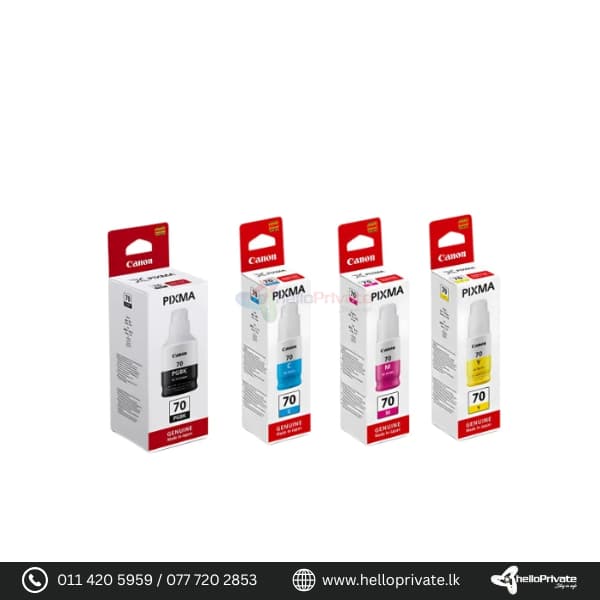



Canon GI-70 Bottle pack

SKU: CAN0111
Brand Canon
Color PGBK, Cyan, Magenta, Yellow (Set of 4)
Compatible Printers Canon PIXMA G5070, G6070, G7070, GM2070
Ink Capacity Black 170ml & Colour 70ml
Page Yield Black: 6,000 pages, Color: 7,700 pages

Buy More, Save Bigger!

Exclusive Wholesale Deals – Grab Them Before They're Gone!

Price range: රු3,300.00 through රු33,000.00

Add to Quote
46 People watching this product now!
  • Pick up from the Hello private

To pick up today

Free

  • Courier delivery

Our courier will deliver to the specified address

2-3 Days

350

  • DHL Courier delivery

DHL courier will deliver to the specified address

2-3 Days

560

Payment Methods:

Description

Canon GI-70 Bottle pack

Introduction

The Canon GI-70 Bottle Pack is designed to provide high-quality, long-lasting prints with exceptional page yield. Ideal for both home and office use, these ink bottles are compatible with Canon PIXMA G5070, G6070, G7070, and GM2070 printers. With its original ink formula, the Canon GI-70 Bottle Pack ensures stable, efficient printing while minimizing damage to your printer head.

Featuring a high page yield—up to 6,000 pages for black and 7,700 pages for color—this bottle pack offers cost-effective printing without compromising on quality.

Product Description

The Canon GI-70 Bottle Pack comes in four colors: PGBK (Pigment Black), Cyan, Magenta, and Yellow. Each bottle is specifically designed for seamless compatibility with Canon PIXMA G5070, G6070, G7070, and GM2070 printers, ensuring reliable performance and smooth ink flow.

Compatible Printers:

  • Canon PIXMA G5070
  • Canon PIXMA G6070
  • Canon PIXMA G7070
  • Canon PIXMA GM2070
Specs Details
Brand Canon
Color PGBK, Cyan, Magenta, Yellow (Set of 4)
Compatible Printers Canon PIXMA G5070, G6070, G7070, GM2070
Ink Capacity Black 170ml & Colour 70ml
Page Yield Black: 6,000 pages, Color: 7,700 pages
Ink Type Pigment-based (PGBK), Dye-based (Colors)
Item Model Number GI-70 Set of 4

KEY FEATURES :

  • High page yield for cost-effective, long-lasting printing
  • Genuine Canon ink for superior quality and consistent performance
  • Reduces ink waste and minimizes printer head damage
  • Easy-to-use, mess-free refill system

Usage Instructions

  1. Ensure your Canon printer is powered off before refilling.
  2. Open the ink tank cover and remove the cap from the tank that needs refilling.
  3. Remove the seal from the ink bottle and align the nozzle with the tank opening.
  4. Carefully tip the Canon GI-70 Bottle Pack and let the ink flow into the tank.
  5. Close the tank cap and printer cover once the refill is complete.
  6. Power on the printer and run a test print to ensure proper installation.

FAQ

  1. Which printers are compatible with the Canon GI-70 Bottle Pack?

    • The Canon GI-70 Bottle Pack is compatible with Canon PIXMA G5070, G6070, G7070, and GM2070 printers.
  2. What is the page yield for these ink bottles?

    • The Canon GI-70 Bottle Pack can print up to 6,000 pages for black and 7,700 pages for color.
  3. Is the refill process easy and mess-free?

    • Yes, the bottles are designed for a smooth and easy refill process, minimizing spills.
  4. Does the ink provide stable printing performance?

    • Absolutely. The Canon GI-70 Bottle Pack is formulated for stable and fluent printing performance, ensuring optimal results every time while protecting the printer head.

Specification

Overview

Color

Black

,

Blue

,

Red

,

Yellow

Processor

Color

Black

,

Blue

,

Red

,

Yellow

Display

Color

Black

,

Blue

,

Red

,

Yellow

RAM

Color

Black

,

Blue

,

Red

,

Yellow

Storage

Color

Black

,

Blue

,

Red

,

Yellow

Video Card

Color

Black

,

Blue

,

Red

,

Yellow

Connectivity

Color

Black

,

Blue

,

Red

,

Yellow

Features

Color

Black

,

Blue

,

Red

,

Yellow

Battery

Color

Black

,

Blue

,

Red

,

Yellow

General

Color

Black

,

Blue

,

Red

,

Yellow

Customer Reviews

0 reviews
0
0
0
0
0

There are no reviews yet.

Be the first to review “Canon GI-70 Bottle pack”

Your email address will not be published. Required fields are marked *

1 2 3 4 5
1 2 3 4 5
1 2 3 4 5

You have to be logged in to be able to add photos to your review.